
How I work with AI

AI makes screens cheap. I make sure they're the right ones.

I use Claude every day, for research, documentation and prototypes. Here's the setup behind it, the calls I make on top of it, and how fast it lets me move.

System

A design system, trackers and tools the whole team builds with.

Judgment

Claude suggests. I decide, and every correction becomes a rule.

Speed

From a Slack message to a customer demo in 9 days.

01 · System

A setup the whole team builds with.

I'm the only designer in a team of seven, and everyone builds with AI. So I made the design knowledge something Claude can use, for me and for them.

  1. InterviewsTranscript intake skill
  2. Personas & validationHypothesis tracker
  3. PrioritiesPriorities tracker
  4. DesignDesign audit skill
  5. PrototypeFigma build & review skills
  • Design system in Claude

    Built from our Figma tokens and styles. Engineering, the CTO and the CEO build with it, so the app stays consistent.

  • Shared context

    Personas from customer interviews and one context file per workspace, so every task starts from the same facts.

  • Trackers

    Priorities and hypothesis validation, updated after every customer call.

  • Custom skills

    Claude Code skills for call notes, design audits, Figma builds and prototype reviews.

  • Design system checker

    A team tool that checks prototypes and live pages against the design system, and writes the fix prompt.

  • Customer Pull dashboard

    A team tool that tracks customer-only success metrics, fed straight from call notes.

The Design system checker

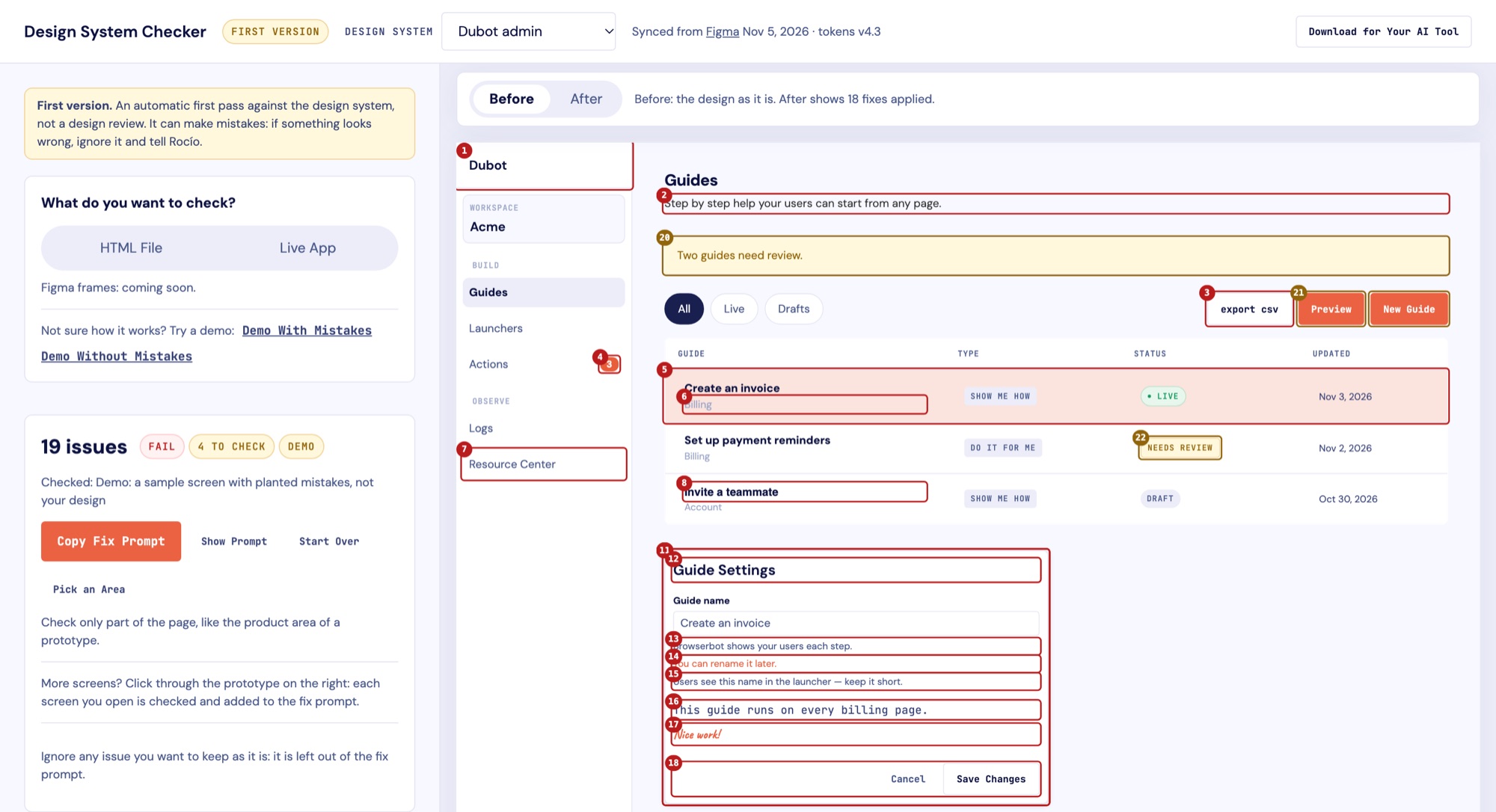
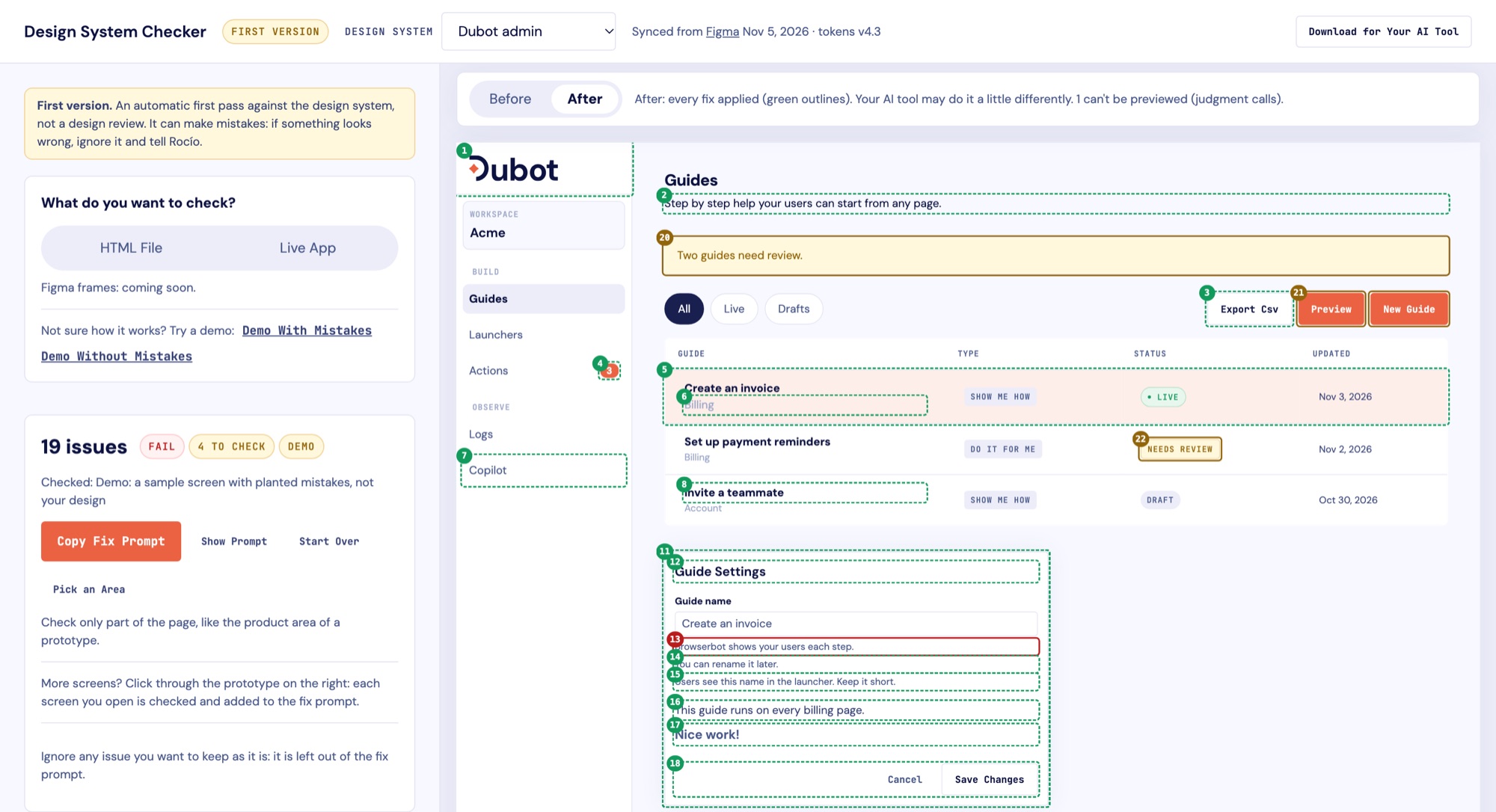
A tool I built for the team. It checks any prototype or live page against our design system, marks each issue, previews the fix and writes a prompt for any AI tool.

Design system checker, Before view: a sample admin screen with 19 numbered issues outlined in red, such as off-system colors, wrong text case and a missing logo, next to a Copy Fix Prompt button. Design system checker, After view: the same screen with every fix previewed in green outlines, including the real logo and corrected labels.
Run on a sample screen with planted mistakes.
  • Why: the problem

    The team builds prototypes, marketing pages and app UI with AI, every few days. Claude fills the gaps by making up colors, components and copy that aren't in our design system.

  • Why: the cost

    Reviewing every screen took hours, mostly listing obvious mistakes. Reviews piled up, and some off-brand UI reached the live app and site because everyone trusted the AI got it right.

  • What it changes

    The team fixes the obvious issues without waiting for me. It doesn't replace a design review: my review now starts at the real design questions.

02 · Judgment

Claude suggests. I decide.

I correct Claude every day. Three examples, recreated with placeholder content:

Journey maps

Claude suggested

Thinks & feels

“This is so frustrating.”

“I'd rather do it by hand.”

Invented quotes, all negative

I changed it to

Thinks & feels

↑“Oh, that's handy.” Admin, interview

↓“Where does this go?” Admin, pilot call

My guesses: held back until customers confirm

Why: made-up quotes read like evidence, and these made the map look worse than reality.

A screen redesign

Claude suggested

Settings

Option A

Option B

Option C

Option D

A copy of the live screen

I changed it to

Who opens this, and why?

The one thing they came to do

Everything else, one click away

Live screen used for content only

Why: the live screen shows what data exists, not what the user needs.

A project plan

Claude suggested

Plan

1. Build the solution

2. Test it

A solution on page one

I changed it to

Plan

1. Users and their journeys

2. Needs and opportunities

3. Then, solutions

Discovery first

Why: a solution on page one anchors the whole team before anyone has looked at users.

Judgment that scales

Each correction becomes a standing rule in my Claude setup. I make it once, and Claude keeps applying it.

Research that changed product direction

  • From side panel to bottom bar

    I flagged early that our panel could crowd products that already have their own AI panel. Interviews confirmed it. When the CEO asked what the launcher should be, I recommended a bottom bar that launches guides and hands open questions to the product's own AI.

  • From actions to guides

    Our first research, in early 2026, pointed to smarter guided tours as the biggest business opportunity, and I recommended them. The product is now moving toward guides.

03 · Speed

From a Slack message to a customer demo in 9 days.

The bottom-bar launcher for Dubot, an AI agent product.

  1. Oct 14

    The ask

    The CEO asks for a launcher in Slack.

  2. Oct 15

    Designed and clickable

    12 Figma states and a working prototype with real routing and two guides. Three rounds of feedback the same day.

  3. Oct 16

    Simpler to build

    Engineering flagged that a new chat surface was costly. I moved answers into the existing side panel the same day.

  4. Oct 23

    In front of customers

    Built into the demo the CEO uses on customer calls.

Hiring for a product design role? I'd love to hear about it.